How Do I Photograph My Room So AI Keeps My Walls and Windows?
Updated October 31, 2026
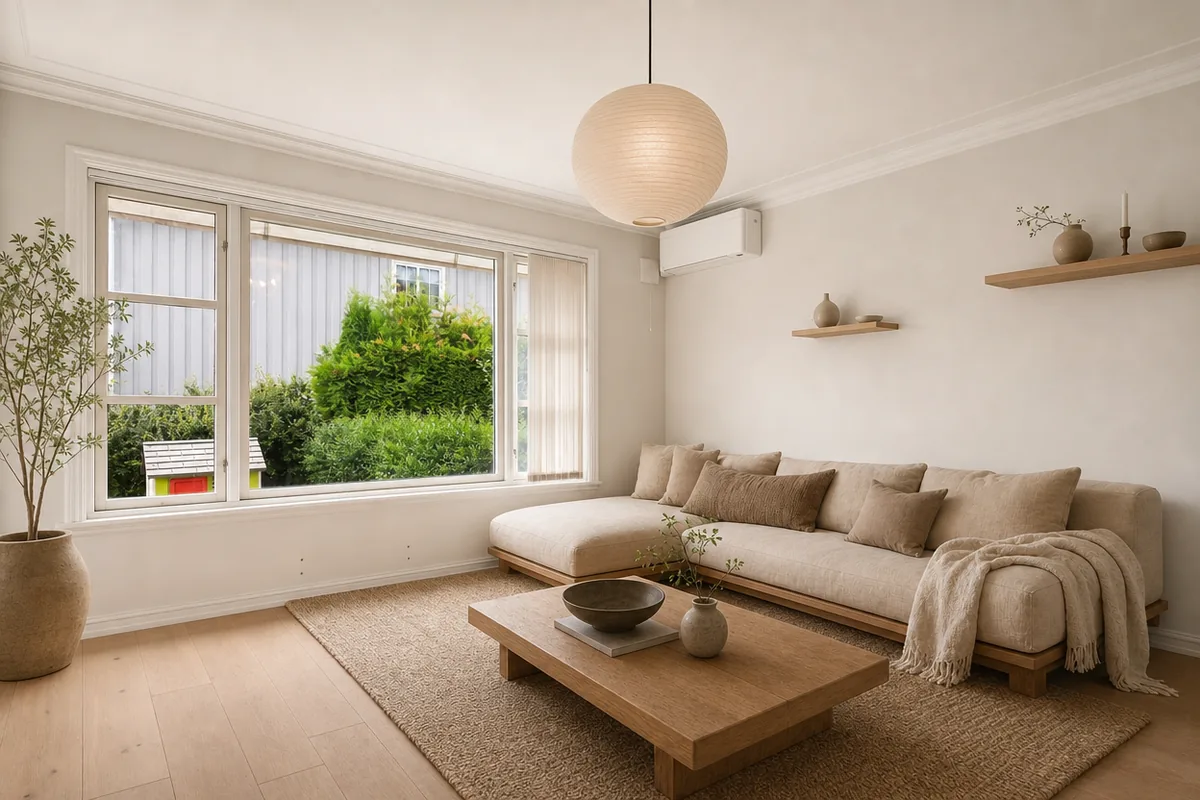
Take one level, landscape photo from a corner or doorway at chest height (about 1.2 to 1.5 m), in daylight with the room lights on, and make sure the windows, doors, floor and the line where the wall meets the ceiling are all in the frame. AI room tools work from what they can see in the photo, so the clearer your walls, windows and corners are, the more likely the redesign keeps them where they really are. Dark photos, motion blur, extreme wide-angle distortion and large mirrors are the most common reasons a tool moves or invents windows and doors (AI Room Styler docs).
The short checklist
| Do this | Why it matters |
|---|---|
| Stand in a corner or the doorway and shoot diagonally across the room | You capture two or three walls, the floor and usually a window, which shows the AI how the walls meet (Kubikly) |
| Hold the phone at chest height and keep it level | Tilting makes door frames and corners lean, and the redesign keeps the lean (Kubikly) |
| Shoot landscape | It fits a room's proportions and shows more floor and side walls than portrait |
| Include the floor and ceiling line | These edges tell the AI how the walls run, and give it space for a rug or a pendant light |
| Use the 1× lens | The 0.5× ultra-wide bends straight lines and stretches furniture at the edges |
| Shoot in daylight, lights on, no flash | Even light shows colors, materials and corners; dark corners get guessed (Interender) |
| Keep a bright window to the side, not straight ahead | A window facing the lens blows out to white and the room goes dark around it |
| Clear small clutter, cables and clothes | The AI can mistake them for furniture (Interender) |
| Leave people and pets out | People also make the photo personal data you're uploading |
Why AI changes windows and walls in the first place
A photo-based room tool doesn't measure your room or build a 3D model. It reads edges, light and perspective in a single image and tries to treat the structure (walls, windows, doors, ceiling height) as fixed while it changes furniture, finishes and color. When an edge is hidden in shadow, cut off by the frame, bent by a wide lens, or doubled in a mirror, the model has to guess, and a guessed window is the one that moves.
The level of change you ask for matters too. AI Room Styler's documentation recommends starting with a light restyle and working up, because its most aggressive "redesign from scratch" setting is the one most likely to produce something that no longer reads as your room (AI Room Styler docs).
Small rooms
In a small bedroom or bathroom it's tempting to switch to ultra-wide to fit everything in. If you have to, keep the phone level and keep the window, door and the furniture you care about away from the edges of the frame, where distortion is strongest. Otherwise, step back into the doorway and use the normal lens, even if one wall is cut off. A slightly tighter, straight photo usually gives a more faithful result than a wide, bent one.
Furniture you want to keep
If you plan to keep the sofa, bed or a particular table, get the whole piece in the photo. Items cut off at the edge or hidden behind other things are harder for the AI to recognize as something to keep (Kubikly). Move small items out, but leave large pieces where they normally stand.
Mirrors, glass and night shots
- Mirrors and big glass doors show a reflected copy of the room, which competes with the real room. Shoot from an angle where the mirror doesn't reflect much, or cover it for the photo.
- Night photos work, but you'll get a night-time design, and dark corners give the AI less to work with.
Check the result against your room
Before you buy anything based on a redesign, compare it with your original photo: are the windows the same size and in the same place, does the door still open where it does, is the ceiling height the same? If the perspective drifted, reshoot straighter or from another corner, as Interender suggests (Interender). Two photos of the same room from different corners are also a cheap way to see which view the AI handles best.
Using these tips with our tool
Our AI room design tool takes a JPG, PNG or HEIC photo up to 10 MB, so an iPhone photo can be uploaded as it is. You pick the room type (living room, bedroom, kitchen, bathroom, dining room, home office, kids room or balcony, or mark the room as empty) and up to four styles, such as Japandi, Scandinavian or Mid-century. Use a photo you own, without people. Like every photo-based tool, it tries to keep your walls, windows, doors and layout but can't guarantee it, and the images are visual ideas, not a floor plan, so check measurements before you buy or build. Each account gets one free watermarked design with no card needed, and a one-time pack of 20 designs is $4.99 with no subscription.